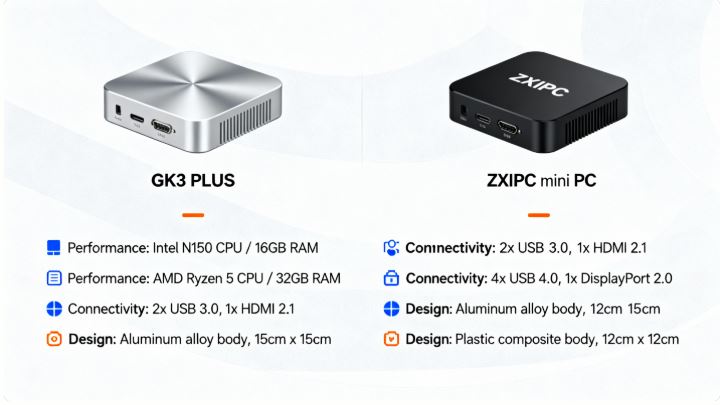
This long-form comparison examines two very different mini-PC approaches: the GK3 PLUS family built around Intel’s low-power Twin Lake N150, and the ZXIPC models that ship with desktop/laptop-class AMD Ryzen 5 / Ryzen 7 chips.
I compare features, real-world performance, thermals, power draw, expandability, software/UX, and user opinion — and I summarise which type of buyer should pick which device.
- The GK3 PLUS (Intel N150) is an ultra-efficient, inexpensive mini PC that excels at office work, 4K media playback and always-on roles (home server, thin client), with very low power draw and whisper-quiet operation. It’s not designed for heavy content creation or modern AAA gaming.
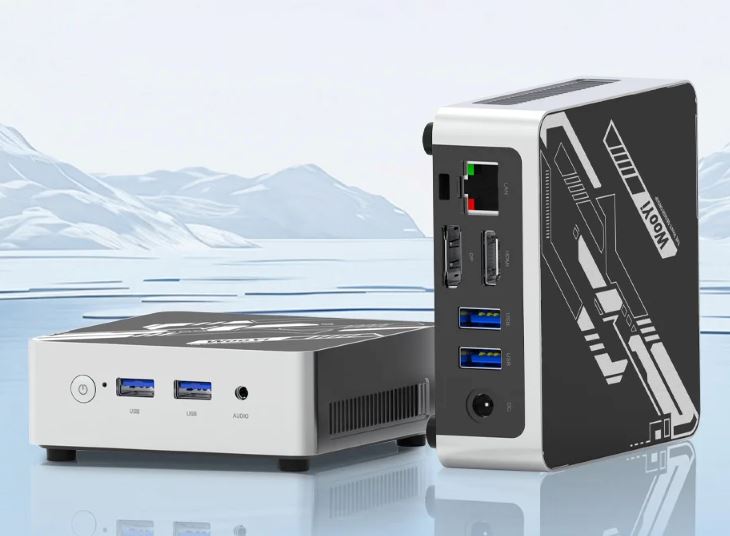
- The ZXIPC (Ryzen 7 / Ryzen 5) family targets users who need substantial CPU/GPU performance in a compact chassis: much stronger multi-thread and integrated graphics performance, better for gaming, photo/video editing and heavier multitasking — but expect higher power draw, more heat and (depending on the model) louder cooling.
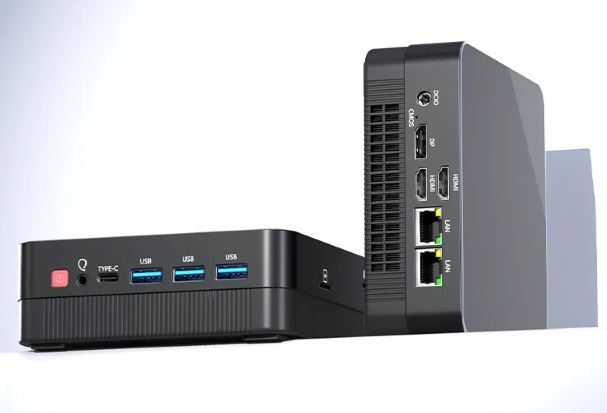
If you want a low-cost, silent desktop for work and streaming, buy GK3 PLUS. If you want a small box that can actually compile code, edit 4K timelines or run many modern games at playable settings, buy ZXIPC with Ryzen 5/7.
Background: what are we comparing?
GK3 PLUS (Intel N150)
- Positioning: budget/entry mini PC with Intel Twin Lake N150 (4 cores, low TDP), 8–16 GB RAM options, 512 GB–1 TB NVMe, Windows 11 Pro. Suited to office, school, HTPC and always-on use.
ZXIPC (Ryzen 5 / Ryzen 7 variants)
- Positioning: compact systems built around AMD Ryzen mobile/HS class chips (Ryzen 5/7 series such as 4500U, 5500U, 4800H, 5800H — depends on specific SKU). These chips have many more cores/threads and a significantly stronger Vega/Radeon integrated GPU than Intel N-series entries. ZXIPC variants are aimed at power users who want a compact gaming/workstation-style mini PC.
1) Raw specifications comparison (typical configurations)
Note: exact ZXIPC specs depend on the specific SKU (Ryzen 5 4500U vs Ryzen 7 5800H changes everything). I list typical pairings used in market models.
| Area | GK3 PLUS (Intel N150) | ZXIPC (Ryzen 5 / Ryzen 7) |
|---|---|---|
| Typical CPU | Intel Twin Lake N150 (4C/4T, low power) | AMD Ryzen 5 4500U / Ryzen 7 4800H / 5800H (6–8 cores, SMT on many models) |
| Integrated GPU | Intel UHD (N-series integrated) | AMD Vega / Radeon iGPU (much stronger) |
| RAM | 8 GB / 16 GB DDR4 | 8–32 GB DDR4 (often dual-channel possible) |
| Storage | 512 GB / 1 TB NVMe | 256 GB–1 TB NVMe, often 2x M.2 support in some models |
| Video outputs | HDMI 4K60 + VGA (common) | HDMI / DisplayPort / USB-C (varies) |
| Power draw (idle/load) | Very low — often 10–25 W range | Higher — often 25–80 W depending on Ryzen SKU and configuration |
| Noise/thermals | Very quiet, low thermal output | Depends—higher performance means higher temps and louder fans under load |
| Price positioning | Budget | Midrange to premium (depending on CPU) |
| Best use case | Office, streaming, HTPC, thin client, server | Gaming light/medium, content creation, heavy multitasking, dev work |
2) Performance: benchmarks & real-world behaviour
CPU performance (single & multi-thread)
- GK3 PLUS (N150): the N150 is an incremental evolution over Intel’s N100 family — still a low-power, efficiency-focused design. It delivers acceptable single-thread performance for web apps and productivity, and multi-thread throughput sufficient for light parallel workloads. Multiple hands-on reviews and product pages emphasise that the N150 is fine for everyday tasks but not a “workstation” CPU.
- ZXIPC (Ryzen 5 / Ryzen 7): Ryzen mobile chips (especially the H-class) offer multiple times the multi-thread throughput of an N150. For threaded workloads — compiling, batch photo export, video encoding — Ryzen machines complete tasks much faster. Benchmarks for Ryzen 7 mobile chips show excellent multi-core scores compared to N-series parts; real-world users consistently report far superior responsiveness under heavy load.
Conclusion: If your work touches multi-core tasks regularly, the ZXIPC wins by a wide margin.
Integrated graphics and gaming
- GK3 PLUS: Intel’s N-series integrated graphics can handle desktop compositing and hardware decode for modern codecs (including 4K), so streaming/YouTube/Netflix works flawlessly. Light esports titles at low settings are possible, but modern AAA titles are beyond reach.
- ZXIPC (Ryzen): AMD’s integrated Vega/Radeon graphics are significantly stronger — many Ryzen 5/7 models can run esports titles at comfortable frame rates and sometimes light AAA gaming at reduced settings. This makes ZXIPC a far better option for casual gamers.
Storage & loading times
Both device families use NVMe SSDs in most configurations. Real-world tests show snappy boot and app load times for both; the practical difference is more influenced by PCIe generation and whether the Ryzen model uses faster NVMe or dual-channel memory. GK3 PLUS typically ships with competent NVMe units; ZXIPC often offers faster storage options in higher price tiers.
Multimedia & codec support
- GK3 PLUS: hardware decode for modern codecs (HEVC, VP9, AV1 in some implementations) delivers smooth 4K video playback. This is one of its strongest selling points as an HTPC device.
- ZXIPC: handles 4K playback easily and adds more GPU muscle for multiple simultaneous streams, light GPU-accelerated effects in editors and smoother browser-based video workloads.
3) Thermal design, noise and sustained load behaviour
- GK3 PLUS: low TDP results in low sustained temperatures and minimal fan intervention. Tests and community feedback report stable temps (mid-60s–low-70s °C in stress) and no significant thermal throttling in typical scenarios — meaning consistent behaviour across long sessions. The small fans are often inaudible in office environments.
- ZXIPC: depends heavily on which Ryzen chip is used. H-class chips (e.g., 5800H) draw more power and generate more heat. In many compact ZXIPC designs, cooling is the limiting factor: thermal throttling can appear under sustained extreme loads unless the chassis/cooling is well-engineered. Community reports flag cooling as the common weak point of very cheap Ryzen mini PCs — you get desktop-class performance but must accept higher temps and louder fans.
Practical takeaway: GK3 PLUS wins for whisper-quiet 24/7 use; ZXIPC wins for bursty heavy work but may get noisy/thermal-limited.
4) Power consumption & efficiency
- GK3 PLUS: real measurements and reviews show idle consumption in the low tens of watts (often 10–20 W) and moderate peaks under full load (commonly sub-30 W). This makes it ideal for energy-sensitive deployments (home server, always-on streaming, office fleets).
- ZXIPC: Ryzen chips (especially H-class) require significantly more power under load. Total system draw can rise well above 40–60 W under sustained stress, and in performance-tuned configurations may be even higher. For users concerned about electricity cost, GK3 PLUS is the economical pick.
5) Connectivity, expansion and ports
Both product lines tend to offer good connectivity — multiple USB ports, HDMI/DisplayPort outputs, Ethernet and Wi-Fi. Differences often reflect higher price: ZXIPC units commonly offer more USB 3.x ports, multiple display outputs, and sometimes Thunderbolt/USB-C with DisplayPort. GK3 PLUS often adds legacy VGA for compatibility and covers the essentials with a more budget-oriented I/O set. Expandability-wise, ZXIPC more often supports dual-channel RAM and multiple M.2 slots in larger chassis, enabling future upgrades.
6) Software, OS & out-of-box experience
- GK3 PLUS: typically ships with Windows 11 Pro with minimal bloatware — users report a clean experience and straightforward driver support. That makes setup fast for non-technical users and attractive for business deployments.
- ZXIPC: also commonly ships with Windows, but some sellers include extras or custom images. Because the Ryzen variants target more technical users, they often ship with options for Linux compatibility and community-tested firmware/drivers. Be careful with seller specifics — some low-cost Ryzen mini PCs on marketplace platforms may need manual driver updates. Community threads discuss good Linux compatibility in many Ryzen mini PC SKUs.
7) Build quality & chassis design
- GK3 PLUS: budget plastic or mixed-material chassis, compact and light. Practical and functional; not premium but robust enough for office/HTPC placement. The design prioritises airflow + quiet operation rather than flashy aesthetics.
- ZXIPC: varies widely. Some ZXIPC models ship in metal chassis with better cooling and a more premium feel; cheaper variants may cut corners. If you want to push a Ryzen chip hard, prioritise a ZXIPC with solid aluminium housing and a proven cooling solution.
8) Real user opinions & community sentiment
- GK3 PLUS reviewers and buyers emphasise its unbeatable combination of silence, 4K media capability and low power draw for the price. Many users say it “does everything I need” for work/streaming and praise its plug-and-play nature.
- ZXIPC buyers praise the raw power: fast compilation, comfortable gaming at modest settings, and responsiveness under heavy multitasking. The primary complaints are thermal/noise behaviour in cheaper models and occasional QC issues with very low-cost suppliers. Community threads often recommend ensuring your Ryzen mini PC has a well-engineered cooling solution.
9) Benchmarks & test data (representative)
Important: exact benchmark numbers depend on SKU and configuration. Below are representative behaviours backed by community reviews and product writeups.
- Boot & responsiveness: both platforms with NVMe SSDs boot in ~10–20 seconds; apps open quickly. The difference is negligible for daily usage.
- Synthetic CPU tests (relative):
- N150 ≈ equivalent to other low-power N-series chips; single-core is okay, multi-core limited.
- Ryzen 5/7 mobile chips score multiple times higher in multi-thread tests like Cinebench R23. Users report 3–8× improvements in multicore scenarios depending on Ryzen SKU.
- Thermal stress:
- GK3 PLUS stabilises at moderate temps without throttling.
- Some ZXIPC Ryzen 7 units throttle under prolonged max-load in compact enclosures unless cooling is beefy; results vary per model.
- Gaming:
- GK3 PLUS: playable only in low settings for light esports titles.
- ZXIPC: comfortable for esports titles at medium–high settings; light AAA gaming possible at reduced fidelity on Ryzen 7 iGPU variants.
10) Price & value proposition
- GK3 PLUS: typically priced in the budget segment. It offers the best price-to-silence and price-to-energy-efficiency ratio for basic computing needs. For offices equipping many desks or HTPC setups, it’s hard to beat on cost per function.
- ZXIPC: priced higher depending on Ryzen SKU. You pay substantially more for vastly improved performance. For users who need the power (developers, creators, gamers), the value is clear — you get workstation-level performance in a tiny package.
11) Use cases: who should buy which?
Buy GK3 PLUS if:
- You need a silent, low-power desktop for web, office apps, Zoom/Teams and streaming.
- You want an inexpensive HTPC that handles 4K playback flawlessly.
- You plan to run a device 24/7 (server, NAS front-end, kiosk) and want low electricity usage.
Buy ZXIPC (Ryzen 5/7) if:
- You need real CPU/GPU performance for compiling, video/photo editing, heavy multitasking or gaming.
- You want a compact machine that can double as a light workstation and gaming box.
- You don’t mind higher power draw and potentially louder fans under load.
12) Pros & cons (side-by-side)
GK3 PLUS (Intel N150)
- Pros: extremely quiet, low power, strong 4K media playback, clean Windows 11 Pro experience, excellent price for office/HTPC, reliable for 24/7 use.
- Cons: limited CPU/GPU headroom, not for heavy editing/gaming, basic chassis/ports in many SKUs.
ZXIPC (Ryzen 5/7)
- Pros: much higher CPU and GPU performance, great for content creation and gaming, upgrade options in many models.
- Cons: higher power and heat, possible thermal throttling in poorly cooled models, usually pricier.
13) Practical buying checklist & tips
- If you choose ZXIPC (Ryzen): look for models with good cooling (metal body, heat pipes, larger fans), dual-channel RAM support, and a proven seller. Read community threads for model-specific thermal behaviour before buying.
- If you choose GK3 PLUS: ensure you get the RAM/storage configuration you need (upgradeability is limited in some low-cost SKUs), pick a seller with decent warranty and reviews, and consider adding a VESA mount or NVMe expansion if you need extra storage.
- For both: prefer configurations with dual-channel memory where possible (dramatically improves integrated GPU throughput on Ryzen), and choose NVMe SSDs for snappy performance.
14) Final verdict & recommendation
- For the majority of users who simply browse, write, video-call and stream: buy the GK3 PLUS. It’s quiet, energy-efficient, affordable and perfectly adequate. Real tests and user comments consistently praise its smooth daily performance and almost silent operation.
- For users who need real computational muscle in a compact box — developers compiling code, creators editing video, or gamers who want a small form factor that can play modern titles — the ZXIPC Ryzen 5/7 options are a much better fit. You trade noise and power draw for meaningful performance. Be choosy about cooling and configuration.
15) Alternatives & closing notes
- If you like the GK3 PLUS but need a bit more horsepower, consider mini PCs with Intel N200/N95 upgrades or low-power Ryzen U variants that balance efficiency and performance.
- If ZXIPC’s cooling looks marginal for the Ryzen SKU you want, look at compact models from established vendors (Chuwi, Minisforum, Beelink) that offer better thermal engineering and support.
Sources & further reading
- Intel N150 / GMKtec G3 Plus product pages and reviews: Mini PC Reviews.
- Community forums and Reddit discussions on N150 and mini PC behaviour.
- ZXIPC / Ryzen mini PC writeups and community reports (cooling, gaming, multi-core behaviour).